8.1 Keypad in Tools Dialog NEW
The Numberblock page of the Tools dialog provides an integrated numeric keypad and the input field of the Command Line. It allows commands, values and object selections to be entered directly from the touch interface, without an external keyboard.
To open the keypad, press Tools on the front panel and select Numberblock on the left-hand side. The Keypad button of the Fixture Selection Toolbar opens the same page.
The page contains:
- the Enter Command … field, which shows the command being entered, with Clear to delete it and >_ to open the Command Line History (see 11.1 Accessing the Command Line);
- the numeric keys 0–9, . (decimal point, or DMX value when used as prefix), /, -, +, Thru, Full, @ (inserts at), Backspace and Enter;
- the object keys Fixture, Group, Preset, Playback and Cue;
- the action keys Record, Edit, Delete, Copy, Off and Name.
To use the keypad:
- Press Tools and select Numberblock.
- Enter the command with the keys, for example Group 7 @ 5 0 (
Group 7 At 50). - Press Enter to execute it.
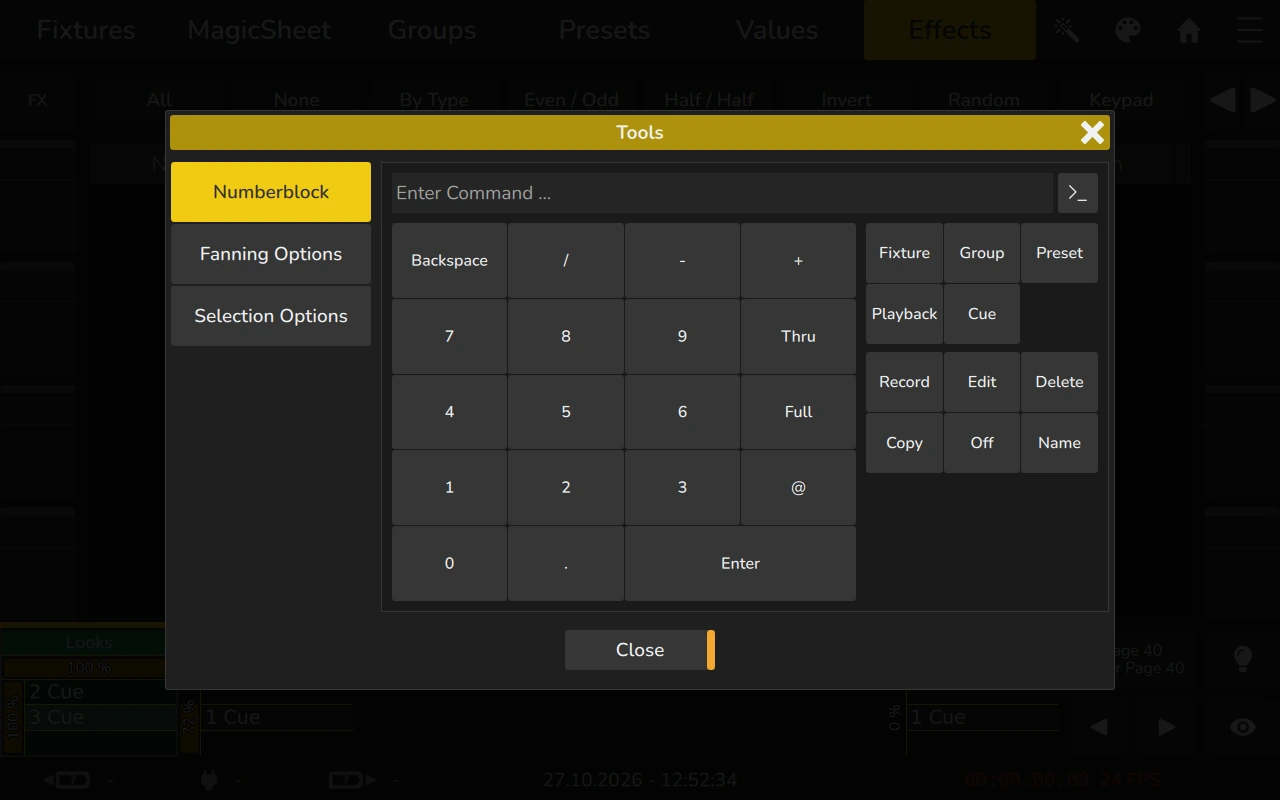
The keypad improves usability, particularly on touch-based systems, by reducing navigation steps and providing faster access to numeric input functions during programming and operation.
The keypad keys can also be sent remotely via OSC: see Keypad in the OSC Command Specification.